



 简体中文
简体中文 English
搜索结果建议
快速链接
Q: How to set auto flight by following the waypoints in Mission Planner?
Q: How to set auto flight by following the waypoints in Mission Planner?
A: The setting steps can follow this manual by click the link below:
Q: Is it OK to keep the direction of arrow on FC different from the aircraft head?
Q: Is it OK to keep the direction of arrow on FC different from the aircraft head?
A: Yes. Just remember to change the corresponding direction at AHRS_ORIENTATION 17 in Full Parameter List .
Q: Why FC cannot be armed?
Q: Why FC cannot be armed?
A: Firstly check if the throttle phase of the transmitter is reversed. If it's not the problem of throttle phase, check what notice popping out in the RadioLink Mission Planner. Follow the notice and the problem can be solved accordingly.
Q: You are unable to arm the vehicle and the LED is flashing yellow. There is a pre-arm check failure in Mission Planner. How to fix it?
Q: You are unable to arm the vehicle and the LED is flashing yellow. There is a pre-arm check failure in Mission Planner. How to fix it?
A: When you are unable to arm the vehicle. Please check the pre-arm failure in Mission Planner and follow the solutions in the chart to solve the problem.
https://ardupilot.org/copter/docs/common-prearm-safety-checks.html
Q: How much memory is in PIXHAWK?
Q: How much memory is in PIXHAWK?
A: The basic frequency memory of PIXHAWK is 180MHz, the RAM memory of PIXHAWK is 260K, and the Flash memory is 2MB.
Q: Is PIXHAWK compatible with the firmware of PIXHWAK4?
Q: Is PIXHAWK compatible with the firmware of PIXHWAK4?
A: No, it's not compatible because the firmware is different.
RadioLink flight controller PIXHAWK, Mini Pix and TURBO PiX are compatible with the firmware from APM only.
Q: DoesF722/F405/PIX6/PIXHAWK/CrossRace/CrossFlight/CrossFlight-CE/Mini Pix support redevelopment?
Q: DoesF722/F405/PIX6/PIXHAWK/CrossRace/CrossFlight/CrossFlight-CE/Mini Pix support redevelopment?
A: Yes
Q: Some RadioLink PIXHAWK doesn’t function normally as the progress bar doesn’t move when calibrating the compass after upgrade the firmware V4.0, what's the problem?
Q: Some RadioLink PIXHAWK doesn’t function normally as the progress bar doesn’t move when calibrating the compass after upgrade the firmware V4.0, what's the problem?
A: Since Dec.29, 2019, ArduPilot official has updated the firmware of arducopter(multirotor), arduplane(acrobatic) and ardurover(car/boat) to V4.0. However, the sensor integrated of firmware V4.0 has been modified, making that of some RadioLink PIXHAWK doesn’t function normally as the progress bar doesn’t move when calibrating the compass. If this problem encountered, please follow below steps:
Note The progress bar should be moving when calibrating compass, meaning PIXHAWK functions and is compatible with firmware V4.0. Then there’s no need to follow below steps
1. Connect the PIXHAWK to a GPS module with compass
Because it is the internal sensor driver modified with the V4.0 firmware and the external sensor remains. To work with an external one, it can function normally.
2. Use the firmware of V3.X instead of V4.0
Arducopter 3.6.12
https://firmware.ardupilot.org/Copter/stable-3.6.12/fmuv2/arducopter.apj
Arduplane 3.9.11
https://firmware.ardupilot.org/Plane/stable-3.9.11/fmuv2/arduplane.apj
Ardurover 3.5.2
https://firmware.ardupilot.org/Rover/stable-3.5.2/fmuv2/ardurover.apj
Click the links above to download the corresponding firmware, then load them in the Mission Planner
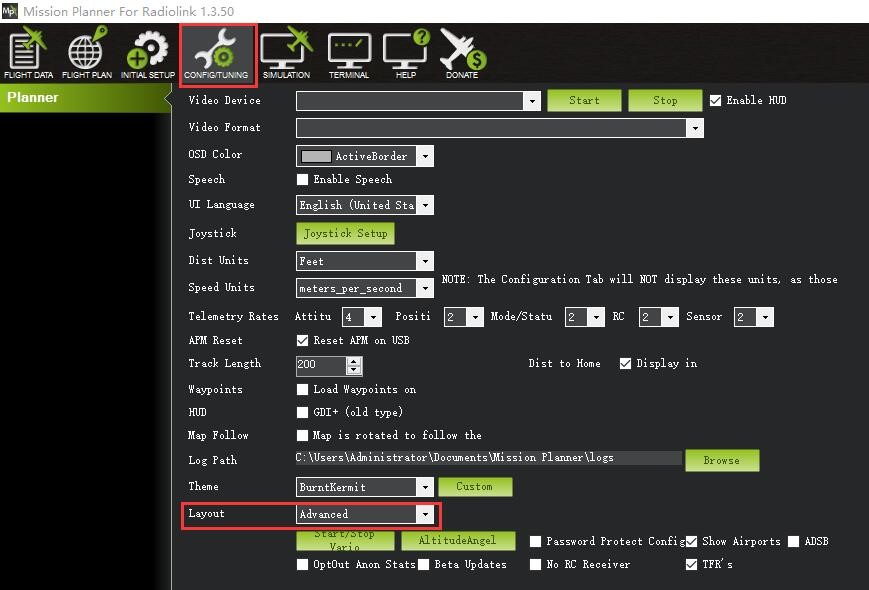
Q: What should I do when I encounter any of the below three problems?
Q: What should I do when I encounter any of the below three problems?
1) The connection time between FC and RadioLink Mission Planner is long;
2) Neither option of Load custom firmware or Pick previous firmware is available at the interface of INSTALL FIRMWARE in the INITIAL SETUP sheet;
3) No option of ALL PARAMETER in the CONFIG/TUNING sheet.
A: When any of the above three problems encountered during the connection to RadioLink Mission Planner and trying to flash the latest firmwares, modify LAYOUT from BASIC TO ADVANCED as below shown
Q: Why there's Bad AHRS notice when connecting FC to RadioLink Mission Planner?
Q: Why there's Bad AHRS notice when connecting FC to RadioLink Mission Planner?
A: When the FC is powered on, level it and remain still for a while, the notice should disappear. This notice usually appears in ACROBATICS firmware.
Q: Why there's Compass Variances notice when connecting FC to RadioLink Mission Planner?
Q: Why there's Compass Variances notice when connecting FC to RadioLink Mission Planner?
A: It's probably because of large disturbance. Remove all possible disturbances such as metal parts on aircraft frame. compass and GPS signal. If the notice is still there, calibrate the compass and repower it on afterwards.
Q: Can I remove the step of arming FC by pressing the safety button as this step has been set as factory default?
Q: Can I remove the step of arming FC by pressing the safety button as this step has been set as factory default?
A: Yes. Search BRD_SAFETYENABLE at the right column in Full Parameter List interface and set it as 0.
Q: How to connect the digital FPV system to MINI PIX and set it?
Q: How to connect the digital FPV system to MINI PIX and set it?
A: Mini Pix with firmware 4.5 and above does not support the OSD. For Mini Pix V1.2/V1.0: Please install ArduPilot firmware 4.4 or below;
For Mini Pix V1.1/V1.0II: Please download and install modified firmware 4.4 or below from RadioLink's official website.
Firmware download link: https://www.radiolink.com/minipix_opensource_firmware
For details of the setting, please refer to the below tutorial:
DJI digital FPV system: https://www.youtube.com/watch?v=nGV6GuiN9N0
Walksnail digital FPV system: https://www.youtube.com/watch?v=ll3zyZqFhcs
Here are the connection diagrams. For DJI digital FPV system, you need RadioLink DiViT, digital video transmission adapter board.
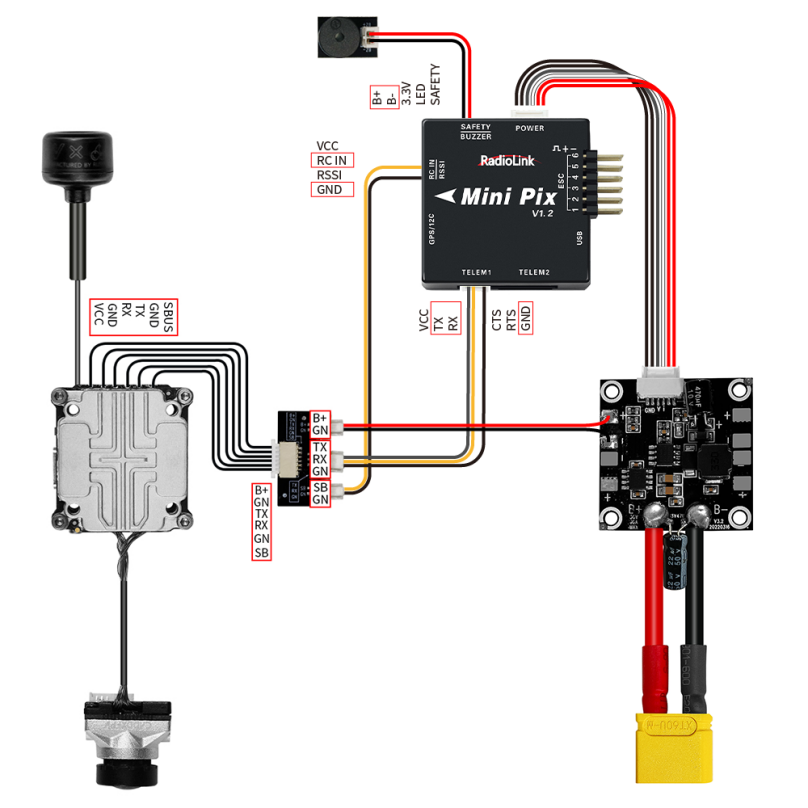
Connect Walksnail digital FPV system to Mini Pix Connect DJI digital FPV system to Mini Pix
Q: Can PIXHAWK/PIX6/Mini Pix/CrossFlight/CrossFlight-CE work with 4-in-1 ESC? How do I connect them?
Q: Can PIXHAWK/PIX6/Mini Pix/CrossFlight/CrossFlight-CE work with 4-in-1 ESC? How do I connect them?
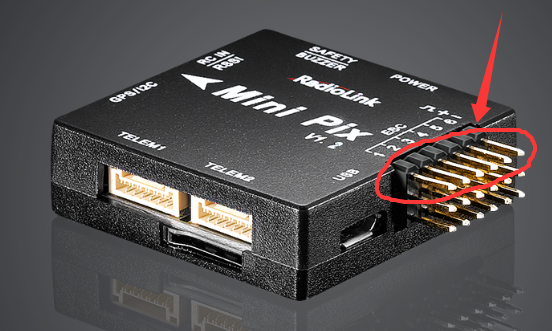
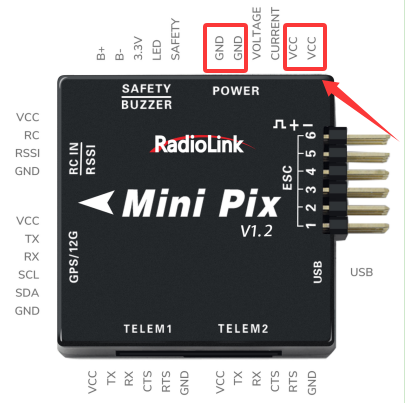
A: Yes. The signal wire of the ESC is connected to the pins of the flight controller. The 5V wire and the ground wire of the ESC is connected to any 5V and GND of the flight controller. Take CrossFlight as an example.
The signal wire of the ESC is connected to the pins of the flight controller. The pin at the top is the signal output channel of the flight controller.
The 5V wire and the ground wire of the ESC is connected to any 5V and GND of the flight controller, as shown below:
Q: When connect open-sourced PIXHAWK with Radiolink ultrasensor module SU04, the module functions well at Alt-Hold Mode. But the aircraft flies to left when toggle the joystick forward at Loiter Mode. Why is that?
Q: When connect open-sourced PIXHAWK with Radiolink ultrasensor module SU04, the module functions well at Alt-Hold Mode. But the aircraft flies to left when toggle the joystick forward at Loiter Mode. Why is that?
A: This is the firmware problem and it can be solved by flashing firmware of V3.6 or above.
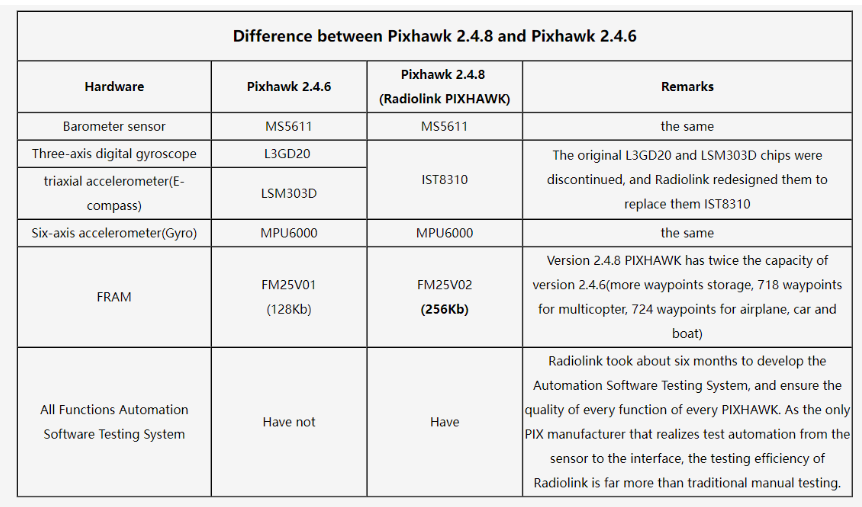
Q: What's the difference between Pixhawk 2.4.8 and Pixhawk 2.4.6?
Q: What's the difference between Pixhawk 2.4.8 and Pixhawk 2.4.6?
Q: Does PIXHWAK support DShot and Oneshot Protocols?
Q: Does PIXHWAK support DShot and Oneshot Protocols?
A: Yes. Aircraft ESC Protocols include DShot and Oneshot Protocols. PIXHAWK supports ESC with Oneshot Protocols by default.
It also supports ESC with DShot Protocols when firmware is updated to 3.6 or above.
PIXHAWK firmware download link:
https://www.radiolink.com.cn/pixhwak_firmware
Q: Does PIXHAWK support RTK?
Q: Does PIXHAWK support RTK?
A: Yes. PIXHAWK supports RTK without any settings on it.
Q: Does PIXHAWK support PX4 firmware?
Q: Does PIXHAWK support PX4 firmware?
A: NO.
Q: Does PIXHAWK support mavsdk?
Q: Does PIXHAWK support mavsdk?
A: NO.
Q: Can PIXHAWK be connected to four 40A ESCs?
Q: Can PIXHAWK be connected to four 40A ESCs?
A: No, it can’t. If PIXHAWK is used for a fixed-wing and connected to a single ESC, the ESC current can be up to 90A; If it is used for a multi-rotor and connected to more than 2 ESCs, the total current of all ESCs cannot exceed 90A. So if it is connected to 4 ESCs, the current of each ESC should be 20A or lower.
Q: Does PIXHAWK support transmitters with ELRS or CRSF Protocol?
Q: Does PIXHAWK support transmitters with ELRS or CRSF Protocol?
A: Yes.
Connect CrossFlight/Mini Pix/PIXHAWK to Mission Planner---CONFI---Full Parameter List---search SERIALX. Change the value of SERIALX_BAUD to 115, and the value of SERIALX_protocool to 23 ---Change the value of RSSI_TYPE to 3 --- RC_options check options: suppress CRSF mode/rate message for ELRS systems (Note: When using an ELRS receiver, you also need to check the option Use 420kbaud for ELRS protocol.) ---Click “Write Params”.
(Note: X represents the telemetry port. If TELEM1 is used, X = 1, then please search SERIAL1 in Full Parameter List)
Q: Why is the pitch channel reversed when PIXHAWK works with open-sourced transmitter?
Q: Why is the pitch channel reversed when PIXHAWK works with open-sourced transmitter?
A: The pitch channel is reversed by default foropen-sourced transmitter. After connecting the flight controller, enter Mandatory Hardware—Servo Output interface, and check the "Reverse" box for the corresponding pitch channel.
Q: How to output RSSI value from receiver to FPV?
Q: How to output RSSI value from receiver to FPV?
A: When you are using AT9S Pro/AT9S/AT9/AT10II/AT10, please refer to the link: https://www.radiolink.com.cn/attransmitter_pixhawk_rssi_output When you are using T16D/T12D/T8S/T8FB, please refer to the link: https://www.radiolink.com.cn/ttransmitter_pixhawk_rssi_output
Q: How to calibrate the accelerometer in Mission Planner?
Q: How to calibrate the accelerometer in Mission Planner?
A: Please refer to the tutorial: https://www.youtube.com/watch?v=6n_jcbPmY5I
Q: How to setup and connect DJI Digital FPV system to the flight controller?
Q: How to setup and connect DJI Digital FPV system to the flight controller?
A: Please refer to the tutorial: https://www.youtube.com/watch?v=nGV6GuiN9N0
Q: How to setup and connect Walksnail Digital FPV system to the flight controller?
Q: How to setup and connect Walksnail Digital FPV system to the flight controller?
A: Please refer to the tutorial: https://www.youtube.com/watch?v=ll3zyZqFhcs
Q: How to connect Skydroid T10 to the flight controller?
Q: How to connect Skydroid T10 to the flight controller?
A: Please refer to the tutorial: https://www.youtube.com/watch?v=-rJuC6j4ed0
Q: How to install TBS Crossfire on the flight controller?
Q: How to install TBS Crossfire on the flight controller?
A: Please refer to the tutorial: https://www.youtube.com/watch?v=T7Vm80klTFM
Q: How to Calibrate ESC on Multi-rotor with the flight controller?
Q: How to Calibrate ESC on Multi-rotor with the flight controller?
A: Please refer to the tutorial: https://www.youtube.com/watch?v=W1B5mgJaCEY
Q: How to calibrate the radio in Mission Planner?
Q: How to calibrate the radio in Mission Planner?
A: Please refer to the tutorial: https://www.youtube.com/watch?v=dh9Lu2BOSnA
Q: How to mount the flight controller on helicopter?
Q: How to mount the flight controller on helicopter?
A: Please refer to the tutorial: https://www.youtube.com/watch?v=um655Uxnqnw
Q: How to calibrate the compass in Mission Planner?
Q: How to calibrate the compass in Mission Planner?
A: Please refer to the tutorial: https://www.youtube.com/watch?v=XR_4e18F5W0
Q: How to set the helicpter?
Q: How to set the helicpter?
A: Please refer to the four tutorials:
https://www.youtube.com/watch?v=15aZ1V8DwrI
https://www.youtube.com/watch?v=w5jljKqSEEw
https://www.youtube.com/watch?v=pph-f_cv7j4
https://www.youtube.com/watch?v=nIt3Y4wVSYA
Q: How to download dataflash log on APM flight controllers?
Q: How to download dataflash log on APM flight controllers?
A: Please refer to the tutorial: https://www.youtube.com/watch?v=bFSnt5ETV9I
Q: How can I load parameters from other APM flight controllers?
Q: How can I load parameters from other APM flight controllers?
A: Please refer to the tutorial: https://www.youtube.com/watch?v=bFSnt5ETV9I
Q: When PIXHAWK is used with a Radiomaster transmitter and CRSF receiver, the transmitter cannot be calibrated in Mission Planner. Why?
Q: When PIXHAWK is used with a Radiomaster transmitter and CRSF receiver, the transmitter cannot be calibrated in Mission Planner. Why?
A: Because the receiver signal is not recognized in Mission Planner. Please connect the CRSF receiver to the data transmission port of the flight controller, and modify the parameters of the data transmission port to 23 in Mission Planner.
Q: Does Mission Planner support the Apple MAC system? Does QGroundControl support the Apple MAC system?
Q: Does Mission Planner support the Apple MAC system? Does QGroundControl support the Apple MAC system?
A: Mission Planner does not support the Apple MAC system, but supports both Windows and Android systems.
QGroundControl Mission Planner supports Windows, Android systems, and the Apple MAC system, but needs to download from its official website.
Q: Can I use QGroundControl to install the firmware of RadioLink PIXHAWK?
Q: Can I use QGroundControl to install the firmware of RadioLink PIXHAWK?
A: Yes, but you can only install the firmware by loading custom firmware when using QGroundControl. You cannot directly click on the model to install the firmware for PIXHAWK, because it is possible to install the PX4 firmware by clicking on the model. And RadioLink PIXHAWK is not compatible with PX4 firmware.
Q: How can I connect PIXHAWK to Mission Planner via Bluetooth?
Q: How can I connect PIXHAWK to Mission Planner via Bluetooth?
A: You can use a Bluetooth data link to connect the flight controller to the Mission Planner. Below is a detailed guide on how to connect the flight controller to the Mission Planner by using a Bluetooth data link.
Q: Can PIXHAWK be connected to an external companion computer such as Raspberry Pi or Nvidia Jetson?
Q: Can PIXHAWK be connected to an external companion computer such as Raspberry Pi or Nvidia Jetson?
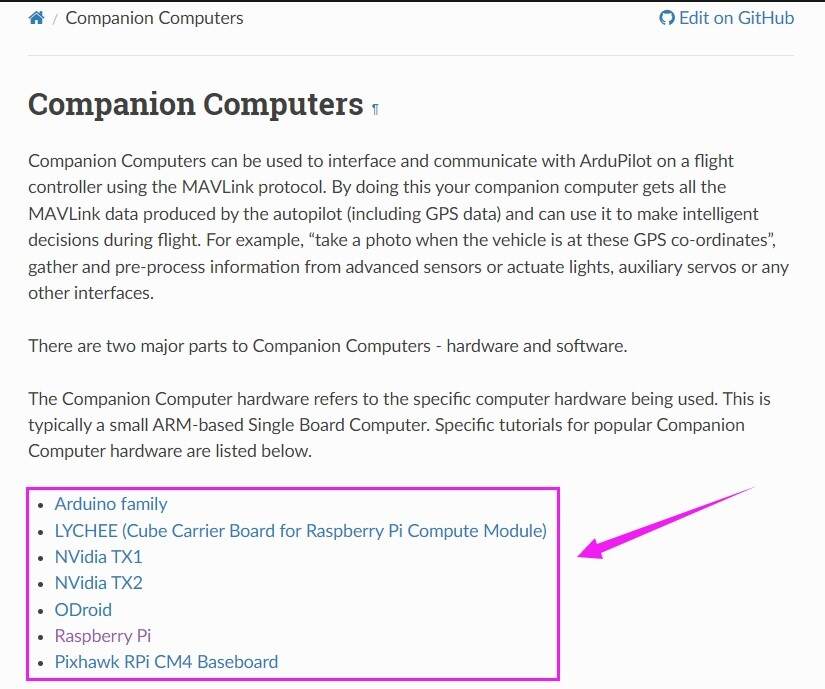
A: Yes. Below is the link to explain the setup. Click your device and then you can get the details on how to connect and set them up.
https://ardupilot.org/dev/docs/companion-computers.html
Q: The motors do not spin even though the arming is successful. Why?
Q: The motors do not spin even though the arming is successful. Why?
A: Check the value of MOT_SPIN_ARM in Mission Planner. If the value of MOT_SPIN_ARM is set to 0, the motors will not spin after the arming is successful, and they will only spin if the throttle joystick is pushed.
Q: RadioLink receiver is bound to RadioLink transimitter, but Mission Planner cannot recognize the radio and cannot calibrate the radio. Why?
Q: RadioLink receiver is bound to RadioLink transimitter, but Mission Planner cannot recognize the radio and cannot calibrate the radio. Why?
A: Please troubleshoot by following the below steps: 1. Check whether the LED indicator of the receiver is blue/purple, that is, SBUS signal output. RadioLink flight controllers support SBUS signal (Most of them also support PPM signal). The blue/purple LED indicator of RadioLink receivers represents the SBUS signal working mode. If the LED indicator of the receiver is not in blue/purple, please short press the binding button to switch to blue/purple. The signal switching methods are different for different receivers. Please refer to the instruction manual of your receiver to switch signals: https://www.radiolink.com/receivers 2. Check whether the connection of all device is correct. The RC IN port of the flight controller needs to be connected to the SBUS signal channel of the receiver, and the positive and negative poles of all connections must be connected correctly.
Q: There is telemetry information when PRM-03 is connected to the TELEM2 port of PIX6/PIXHAWK/CrossRace/CrossRace Pro/CrossFlight/CrossFlight-CE/Mini Pix flight controller , but no OSD information when PRM-03 is connected to the TELEM1 port of the flight controller. Why?
Q: There is telemetry information when PRM-03 is connected to the TELEM2 port of PIX6/PIXHAWK/CrossRace/CrossRace Pro/CrossFlight/CrossFlight-CE/Mini Pix flight controller , but no OSD information when PRM-03 is connected to the TELEM1 port of the flight controller. Why?
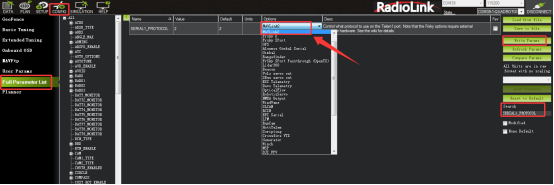
A: You need to adjust the parameter of the flight controller. Connect the flight controller to Mission Planner. Search for SERIAL1_PROTOCOL in the Full Parameter List. Select MAVLink2, and click Write Paras to save the modification.
Q: Is PIXHAWK a Linux board?
Q: Is PIXHAWK a Linux board?
A: NO.
Q: Can the ESC pins of PIXHAWK be used to supply power for flight controller?
Q: Can the ESC pins of PIXHAWK be used to supply power for flight controller?
A: The ESC pins of PIXHAWK only supply power for external devices (such as servos), not for the flight controller.
Q: How to power PIXHAWK without using the power module?
Q: How to power PIXHAWK without using the power module?
A: You can connect the positive and negative poles of the ESC or BEC module to the positive and negative poles of the POWER port of the flight controller.
Q: RadioLink Mission Planner has two compasses shown if FC connected is GPS integrated. How to distinguish which FC compass it is?
Q: RadioLink Mission Planner has two compasses shown if FC connected is GPS integrated. How to distinguish which FC compass it is?
A: If the flight controller and the GPS with compass internal connect to the Mission Planner at the same time, the Compass #1 indicate the compass of GPS, meanwhile, the "Externally mounted" and the GPS direction select box will pop out on the Mission Planner. The Compass #2 indicate the compass of the flight controller internal.
Calibrate interface will shows as picture below when use with GPS.
If the GPS mounted with the same direction with flight controller, then it need not to setup the direction of GPS in Mission Planner but if you mounted the GPS with the different direction of PIXHAWK, you have to setup the right direction in the Mission Planner.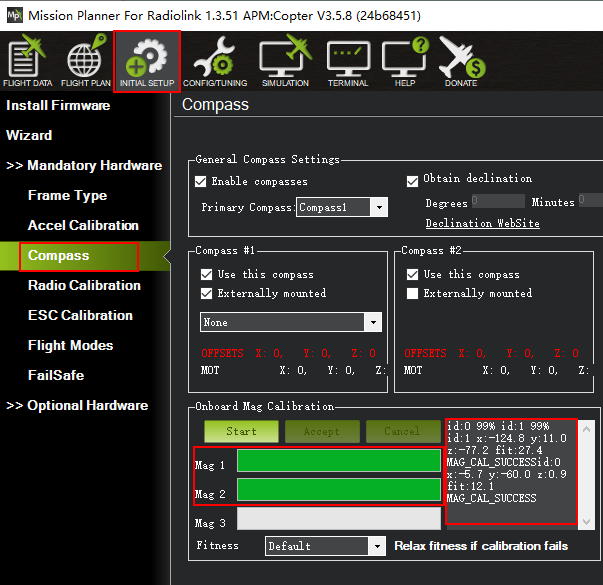
Q: RadioLink Mission Planner has two compasses shown if FC connected is GPS integrated. How to distinguish which FC compass it is?
Q: RadioLink Mission Planner has two compasses shown if FC connected is GPS integrated. How to distinguish which FC compass it is?
A: If the flight controller and the GPS with compass internal connect to the Mission Planner at the same time, the Compass #1 indicate the compass of GPS, meanwhile, the "Externally mounted" and the GPS direction select box will pop out on the Mission Planner. The Compass #2 indicate the compass of the flight controller internal.
Calibrate interface will shows as picture below when use with GPS.
If the GPS mounted with the same direction with flight controller, then it need not to setup the direction of GPS in Mission Planner but if you mounted the GPS with the different direction of PIXHAWK, you have to setup the right direction in the Mission Planner.
Q: How to set parameters if use PIXHAWK connect to the QuadPlane?
Q: How to set parameters if use PIXHAWK connect to the QuadPlane?
A: The setting steps can follow this manual by click the link below:
https://ardupilot.org/plane/docs/quadplane-support.html
Q: Why there's no data displays when FC connects to the RadioLink Mission Planner?
Q: Why there's no data displays when FC connects to the RadioLink Mission Planner?
A: Connect the RadioLink Mission Planner to flash the latest firmware. If it's notified that the latest firmware is already exist, flash again by changing another model e.g. ACROBATICS . If the problem still cannot be solved, it's probably the barometer is broken. Please send mails to after_service@radiolink.com.cn to furthur confirm and ask for accessory purchase.
Q: What does COMPASSRARIANCE mean when connecting FC to RadioLink Mission Planner?
Q: What does COMPASSRARIANCE mean when connecting FC to RadioLink Mission Planner?
A: It means that there's problem about the compass. It can be solved by either calibrating the compass or removing possible disturbance resources to the compass.
Q: The aircraft descend speed is too high with the default value. Can this parameter be modified?
Q: The aircraft descend speed is too high with the default value. Can this parameter be modified?
A: Yes. This parameter can be modified at LAND_SPEED with the minimum speed as 30cm/s.
Q: Why my computer cannot identify the USB port of the FC after flashing the firmware?
Q: Why my computer cannot identify the USB port of the FC after flashing the firmware?
A: It is because the hardwares of Turbo Pix and Mini Pix have been upgraded. FC of V2.0 can ONLY flash firmware with the latest RadioLink Mission Planner V1.3.50. But FC of V1.0 can flash firmware with RadioLink Mission Planner either of V1.3.49 or V1.3.50.
Q: Why the indicator on FC stays red after it's powered on?
Q: Why the indicator on FC stays red after it's powered on?
A: There are two possible reasons
1) The memory card is not well inserted or doesn't function.
2) The firmwares need to be flashed.
Q: The calibration of accelerometer, compass, radio has been finished, but why the plane turned over when it took off?
Q: The calibration of accelerometer, compass, radio has been finished, but why the plane turned over when it took off?
A: It comes from the wrong direction of motor or the reversed installation of the propellers. Check the motor and propellers.
Q: What firmware to download in ArduPilot official website?
Q: What firmware to download in ArduPilot official website?
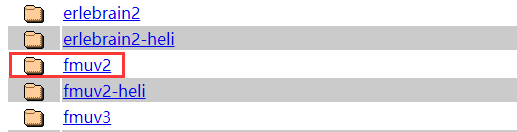
A: Firmware fmuv2 or fmuv3 will be chosen depending on the version of PIXHAWK:
① the V3.0 PIXHAWK should upgrade the fmuv3 firmware
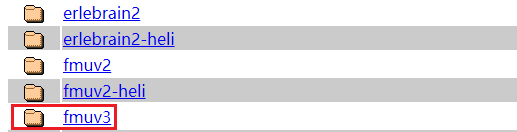
② the other version(except V3.0) of PIXHAWK supports 1M fmuv2 firmware by default. It also supports 2M fmuv3 firmware. You can download fmuv3 firmware from the ArduPilot website and then upgrade the firmware.
Q:Why only telemetry of model voltage is sent to the transmitter, while other data such as peed, climb, throttle, longitude, latitude are not sent to the transmitter when PRM-03 is used with the flight controller?
Q:Why only telemetry of model voltage is sent to the transmitter, while other data such as peed, climb, throttle, longitude, latitude are not sent to the transmitter when PRM-03 is used with the flight controller?
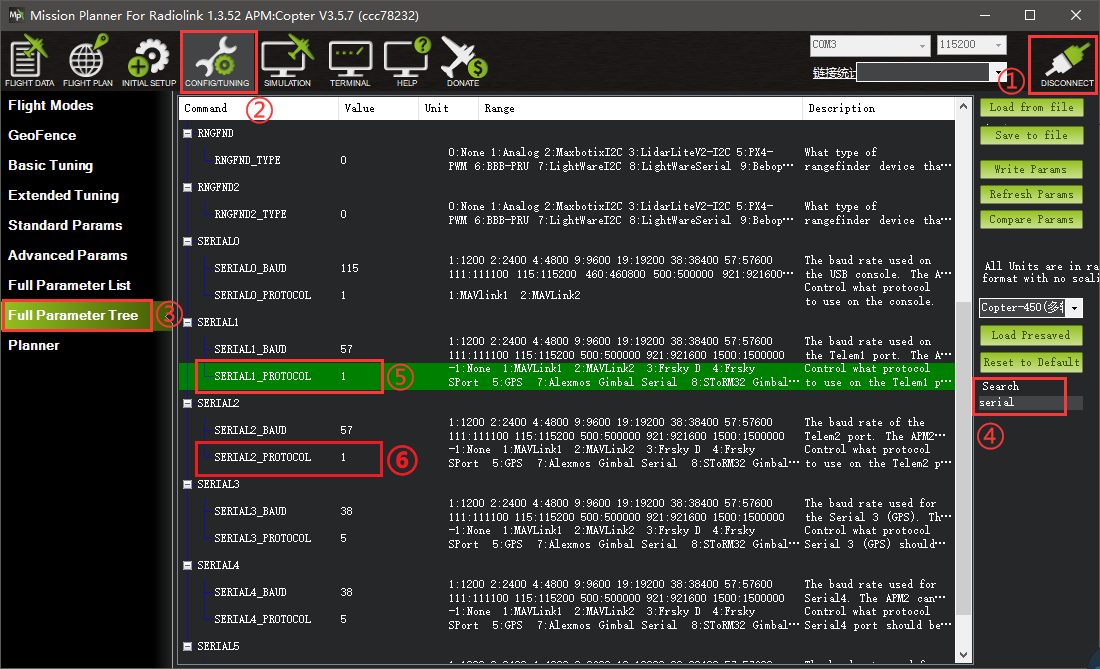
A: Since ardupilot updated the firmware recently, when users use PRM-03 with RadioLink transmitters AT9S Pro, AT9S, AT9, AT10II, AT10 and the ardupilot pixhawk flight controller which with the V4.1 or above firmware, only telemetry of model voltage is supported, telemetry of other OSD data is not supported. Please solve the problem by changing the value of SERIAL1-PROTOCOL and SERIAL2-PROTOCOL in Mission Planner.
CONFIG- Full Parameter Tree- search “serial”-Change the value of SERIAL1-PROTOCOL and SERIAL2-PROTOCOL to 1(MAVLink)
Note: PRM-03 produced before May 31, 2022 can refer to this method to modify the value, and those produced after May 31, 2022 do not need to modify the value.
Q: How to set the high level and the low level in PIXHAWK?
Q: How to set the high level and the low level in PIXHAWK?
A: The setting methods are as follows:
1. Search SERVOx_FUNCTION in the Full Parameter List, and set data to -1 (x means channel)
2. Search RELAY_PIN and modify it to the value of the corresponding channel (The value corresponding to channel 1 is 50, the value corresponding to channel 2 is 51, and so on)
3. If there are multiple relays, set RELAY_PINx (x represents relay, RELAY_PIN2 represents relay 2, etc.)
4. Set the transmitter channel to control the high level/low level of the relay. Search RCx_OPTION, (RCx means the transmitter channel, RC7 means the 7th channel of the transmitter, etc.), and select Relay On/Off, which means controlling the first relay
5. If there are multiple relays, set multiple channels as above, search RCx_OPTION, and select Relayx On/Off (x means relay, for example: If the 5th channel of the transmitter controls the second relay, select RC5_OPTION as Relay2 On/Off)
6. Restart the flight controller
Q: Why there is no Fail Safe in Firmware version Airplane_v4.0.5?
Q: Why there is no Fail Safe in Firmware version Airplane_v4.0.5?
A: Firmware version Airplane_v4.0.5 has been upgraded. Set Fail Safe in all parameter list.
Q: Can PIXHAWK/PIX6/Mini Pix/CrossFlight/CrossFlight-CE/F722/F405 be used to control gasoline power fixed wing?
Q: Can PIXHAWK/PIX6/Mini Pix/CrossFlight/CrossFlight-CE/F722/F405 be used to control gasoline power fixed wing?
A: Yes.
Q: How to know if PIXHAWK is compatible with my receiver?
Q: How to know if PIXHAWK is compatible with my receiver?
A: Mini Pix supports PPM and SBUS signal input. So Mini Pix is compatible with receivers which support PPM and SBUS output. Pls check if your receiver support PPM and SBUS output.
Q: Does PIXHAWK support displaying flight data on the DJI goggles?
Q: Does PIXHAWK support displaying flight data on the DJI goggles?
A: Yes. Click the link below to view related tutorials:
https://ardupilot.org/copter/docs/common-msp-osd-overview-4.2.html
Q: I use PIX6/PIXHAWK/CrossFlight/CrossFlight-CE/CrossRace/CrossRace Pro/Mini Pix with a ELRS receiver. I set FLT_MODE on CH5, and I assign a 3 position switch for 3 flight modes. The flight mode in the middle position is not available. Why?
Q: I use PIX6/PIXHAWK/CrossFlight/CrossFlight-CE/CrossRace/CrossRace Pro/Mini Pix with a ELRS receiver. I set FLT_MODE on CH5, and I assign a 3 position switch for 3 flight modes. The flight mode in the middle position is not available. Why?
A: When using an ELRS receiver, Channel 5 supports only 2-position switches, not 3-position switches. If you need to use the middle position of the 3-position switches to switch flight modes, you can assign the flight mode control to a channel other than Channel 5. Just set FLT_MODE to other channels in Mission Planner.
Q: How to connect a Spektrum receiver to PIX6/PIXHAWK/CrossFlight/CrossFlight-CE/CrossRace/CrossRace Pro/Mini Pix?
Q: How to connect a Spektrum receiver to PIX6/PIXHAWK/CrossFlight/CrossFlight-CE/CrossRace/CrossRace Pro/Mini Pix?
A: Please refer to the below link:
https://ardupilot.org/copter/docs/common-spektrum-rc.html#common-spektrum-rc
FAQ





 简体中文
简体中文- English