
F110S V2
Mini Racing Drone
Altitude Hold by Inertial Navigation
User Manual
* Please be kindly noted that this manual will be updated regularly and please visit RadioLink official website to download the latest version:www.radiolink.com
Thank you for purchasing RadioLink mini racing droneF110S V2.
To fully enjoy the benefits of this product and ensure safety, please read the manual carefully and set up the device as instructed steps.
If any problems found during the operation process, either way listed below can be used as online technical support.
Send mails to after_service@radiolink.com.cnafter_service1@radiolink.com.cn or after_service@radiolink.com.cnafter_service1@radiolink.com.cn and we will answer your question at the earliest.
Send message to us on our Facebook page or leave comments on our YouTube page.
If purchased from an approved dealer or distributor, you can contact them directly for support.
All manuals and firmwares are available on RadioLink official websitewww.radiolink.comand more tutorials are uploaded. Or follow our Facebook and YouTube homepage to stay tuned with our latest news.
Never operate models during adverse weather conditions. Poor visibility can cause disorientation and loss of control of pilots model.
Never use this product in a crowd or illegal areas.
Always ensure the trim levers at 0 and battery properly charged before connecting the receiver.
Always check all servos and their connections prior to each run.
Stay at a certain distance from the aircraft during flight to avoid getting hurt by the components of high-speed rotation (eg. Props, brushless motors)
After landing off, make sure the aircraft is disarmed and props have stopped moving before getting close to touch the aircraft.
Always be sure about turning off the receiver/powering off the aircraft before the transmitter.
Follow the instructions of props installation in case of dropping during flight.
To ensure the best radio communication, please enjoy the flight at the space without interference such as high voltage cable, communication base station or launching tower.
This product is not a toy and is NOT suitable for children under the age of 14. Adults should keep the product out of the reach of children and exercise caution when operating this product in the presence of children. Water or moisture may enter the transmitter inside through gaps in the antenna or joystick and cause model instability, even out of control. If running in the wet weather(such as game) is inevitable, always use plastic bags or waterproof cloth to cover the transmitter.
This device complies with part 15 of the FCC Rules. Operation is subject to the following two conditions:
This device may not cause harmful interference, and Prevents external wireless interference, including interference that may cause undesired operation.
Any Changes or modifications not expressly approved by the party responsible for compliance could void the user's authority to operate the equipment.
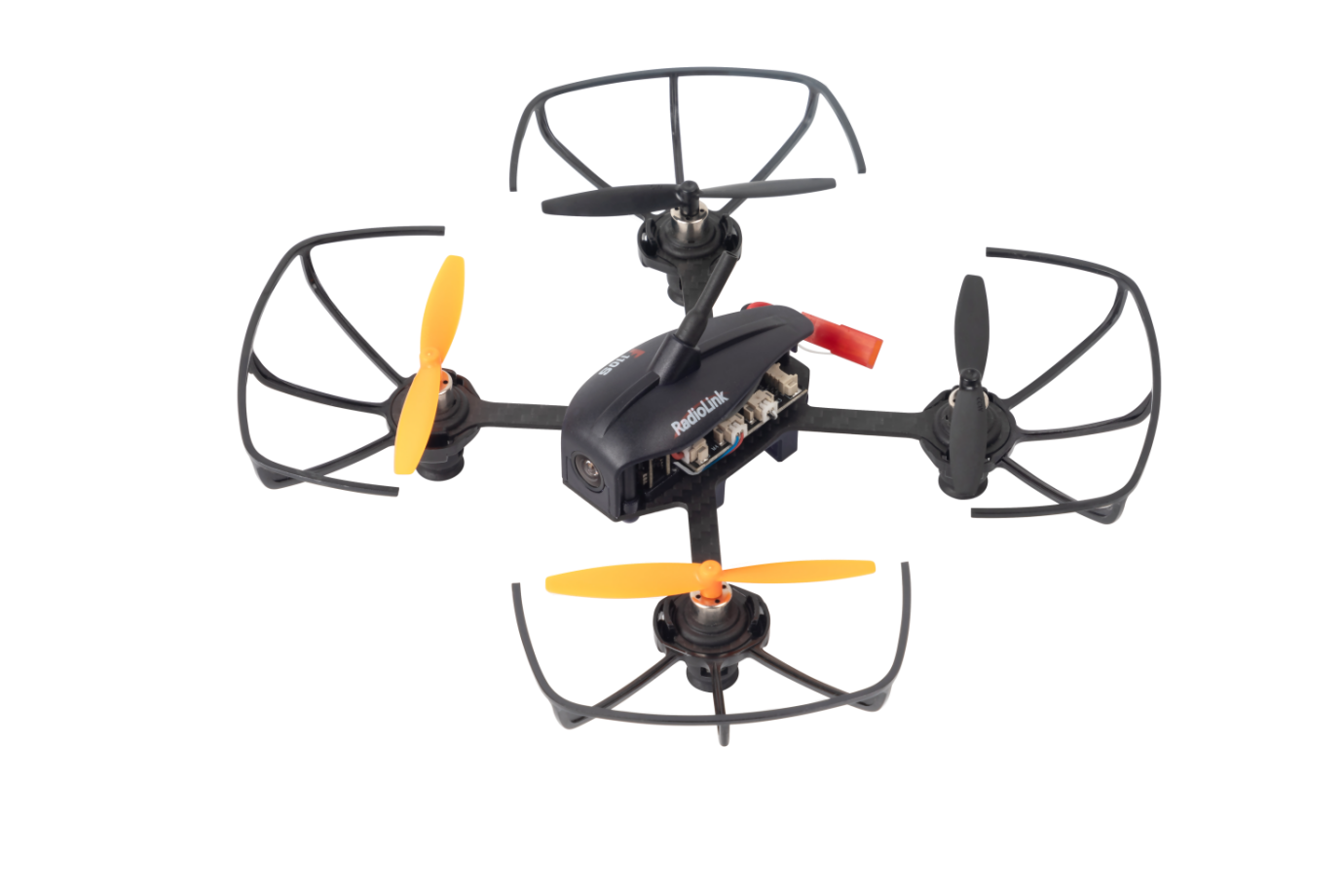
As the mini racing drone that can fly at high speed at Altitude Hold Mode,F110S V2 is very easy to master for drone freshman. The inertial navigation system technology blending Kalman filtering, gyro, accelerometer and barometer makesF110S V2 possible to flight through narrow space with accuracy and hold altitude even it’s less than one-meter height to the surface or at high speed. With three flight modes Alt-Hold at low speed, Alt-Hold at high speed and Stabilize, beginners can flight stably at the first trial.
F110S V2 is monitored by RadioLink mini racing drone flight controller CS360, which is different from other flight controllers with PID needs to be set before use,will tune automatically. The software noise reduction technology not only enables a more pleasant flight but also makes the motors more responsive and more efficient than traditional 8520 coreless motors.It can be thrown and start to fly at any angle even under high-speed and remains stable even facing with sudden airflow fluctuations such as during takeoff, under braking, or after extended flying. Without compass locking,F110S V2 always automatically modify angles during flight.
Chapter 1 Before Flight
1.1 Power Supply
Power for transmitter T8FB: T8FB supports 4 pieces AA batteries or 2S to 4S LiPo battery. Make sure the battery is fully charged before using them/it to power on T8FB.
Power for F110S V2: The voltage of 1S LiPo battery packed with F110S V2by default is not fully charged so the battery needs to be charged with the charger CM120 before flight.
The LiPo battery charger CM120, specially designed for 1S LiPo battery,sharing the professional development and high precision of CB86PLUS, ensures safer charging and battery life span.
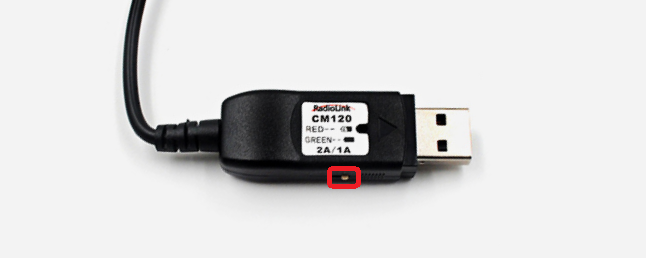
Charging current can be set as 1A or 2A by toggling the switch at the side of the charger.
Red LED indicates the battery is under charging and green LED indicates the battery is fully charged.
CM120 appliesgeneral USB connector, both computer and power bank for mobile phone can be used with CM120.
Note Voltage output of power supply should be NO higher than 5V.
1.2 Remote Controller
The two joysticks of T8Scorrespond to the four basic channelsrespectively . The below example takes RadioLink radio T8S Mode 2 (Throttle on the left stick) .
Left joystick
Make the F110S V2rise or descend by toggling the left stick vertically upward or downwardand rotate clockwise or anticlockwise by toggling the left stick to the left or right.
Right joystick
Make the F110S V2 fly forward or backwardby toggling the right stick vertically upward or downwardand turn left or right by toggling the right stick to the left or right.
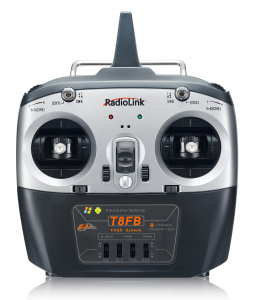
Note If it’s the transmitter from other brands used with RadioLink F110S V2, make sure that the receiver should be SBUS signal output supported. Once the receiver is installed on the mini drone, the phase of the throttle should be reversed while the other three channels normal and the CH5 should be set with a 3-way switch.
1.3 F110S V2
Assembled as building block makes the RC students exercise their DIY ability and free from lengthy mobile games.Learning knowledge of science and technology when assembling, setting parameters and flight.
1.4 Joysticks & Flight Movements
A. Throttle: Rise/ Descend/Hover
Toggle the throttle stick (on the left) vertically upward and F110S V2 will rise and vertically downward, thendescend.
If at Alt-Hold Mode, toggle the throttle stick vertically upward till the F110S V2rises to the preferred height, thentoggle back to center position and release, the F110S V2 will remain at this height.
Note Hovering is also called Altitude Hold, which can be only realized under the Alt-Hold Modeeither at low speed or high speed. BUT NOT STABILIZE MODE.

Yaw: Clockwise/Anticlockwise
Toggle the rudder stick (on the left) to the left andF110S V2 will turn anticlockwise and to the right, thenclockwise.
Pitch:Forward/Backward
Toggle the elevator stick (on the right) vertically upward andF110S V2 will flight forward and vertically downward, then backwards.
Roll: Right/Left
Toggle the sileron stick (on the right) to the left and F110S V2 will turn left and to the right, then turn right.
Chapter 2 Get Ready to Flight
2.1 Motor Installation
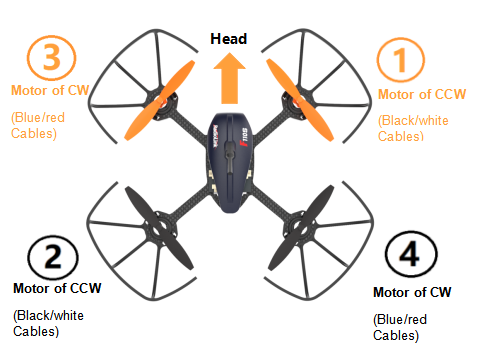
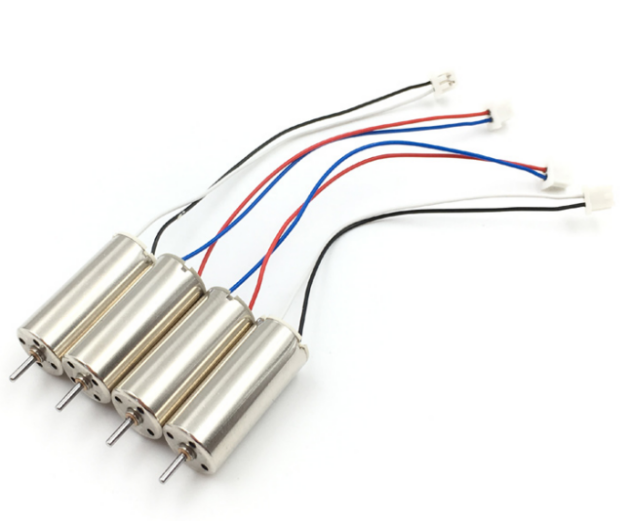
To make the aircraft fly, motors usually rotate clockwise(CW)/counterclockwise(CCW) with the propellers. The rotation direction of F110S V2 motors can be identified by the cable colors. That is, red/blue means motor of clockwise(CW) while black/white means that of counterclockwise(CCW). It is very important to make sure about the rotation direction as below when installing motors. Otherwise, the drone would fail to take off.
2.2 Propellers Installation
F110S V2 is installed with propellers protector by factory default. To ensure a safety flight, it’s strongly advised to checkif the protector are well installed .
Find the two notches respectively on the motor protector and propeller protector.
Put on the propeller protector from the bottom and adjust the position of the notches correspondingly.
Stabilize the frame with left hand and buckle the notch of one side with right hand. Then buckle the notch of the other side with left hand. A “DA” sound will be heard if the installation is done with success.
Note After the installation of the four propeller protectors, double confirm if they are leaning or slightly shake F110S V2 to see if they drop. If they are crooked or drop, repeat the above steps to ensure the well installation.
If the default propellers get worn and needs to be replaced after a period of flight,it is important to well identify the rotation direction of propellers. If installed incorrectly, F110S V2 can’t take off even the throttle is pushed to max.
In order to identify the propellers rotation, take a propeller and observe there’s a radian at both sides of the small cylinder in the middle. The higher part (also called windward side) of the right propeller is at the front and the rotating motor will make propeller rotate counterclockwise(CCW). On the contrary, that is clockwise(CW) rotation. For the 65mm GEMFAN propellers used on F110S V2, there are two marked with a letter R, meaning they should be installed on the motors of clockwise.
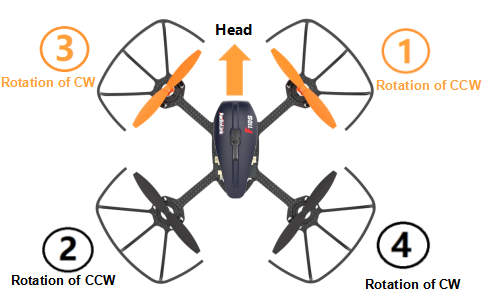
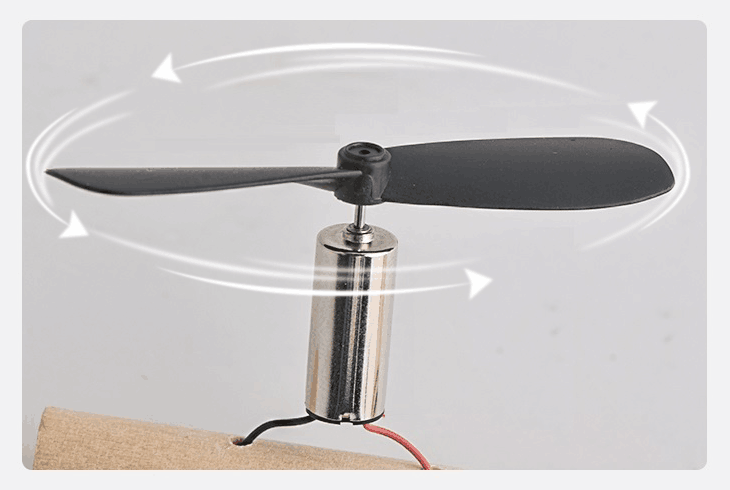
When the installation is done, make sure the four motors are vertical to the aircraft frame. Adjust them to vertical positions if necessary, otherwise F110S V2 may not flight successfully.
2.3 Power OnF110S V2
Before powering on F110S V2, fully charge the 1S LiPo battery first. Plug the PH2.0 end of the battery into the F110S V2, then insert the battery into the battery frame underat the bottom ofF110S V2..
Put F110S V2 on a level surface and do not move it when the green LED is flashing.NEVER power on F110S V2 by putting on hand as it’s not leveled.
Orange propellers indicates the head of F110S V2 by default.make sure they point to the same direction as the pilot when powering on and be ready to fly, to ensure safety.
The green LED of F110S V2 will begin flashing when powered on. When it’s off, it meansF110S V2finishes calibration.
NoteHead direction is determinate.If F110S V2 iscalibrated with the directiondifferent from the default, it will turn back to the default direction automatically when starts flying,That’s what we called Head Front Forward Point Without Compass.
2.4 Flight Note
If it’s the first time of flying drone, flight mode of Altitude Mode-Low Speed is strongly advised to set. At the altitude mode, when toggle the throttle upward till the drone reaches a certain height and release, F110S V2 will remain at this height. It’s simpler because pilots only need to toggle the other joystick to make the F110S V2 move forward/backward or turn left/right. If it’s the Stabilize Mode chosen, try to toggle the joysticks slightly to correct the flight and avoid the drone having sudden moves.
If F110S V2 drops by hitting something, toggle the throttle joystick to the bottom position immediately to stop motor rotation.
Make sure the signal output of receiver is SBUS to ensure normal operation of F110S V2. For RadioLink receivers(R8SM/R6DSM) installed on F110S V2, the led indicator is blue/purple when it’s SBUS working mode.
2.5 Setup compatible Transmitters
F110S V2 is compatible with all RadioLink transmitters AT10/AT10II/AT9/AT9S/AT9S Pro/T8FB/T8S and transmitters of other brands that support SBUS output.
There are two different receivers optional by factory default, R6DSM or R8SM. R6DSM is compatible with RadioLink AT10/AT10II/AT9/AT9S/AT9S Pro while R8SM is compatible with RadioLink T8FB/T8S.
T8FB/T8S
RadioLink 8-channel transmitter are well set by factory default with the flight modes. To control F110S V2, binding is the only thing needs to be done.
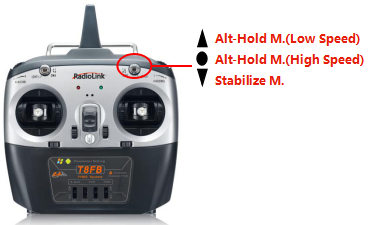
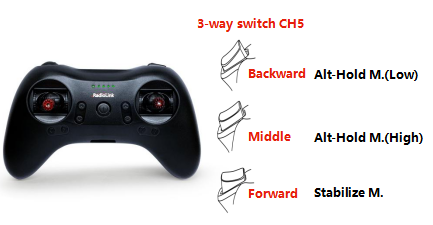
There are three flight modes for F110S V2 including Altitude Mode- Low Speed, Altitude Mode- High Speed and Stabilize Mode. It can be changed by pressing the three-way switch on the right of T8FB- SWB or of T8S- CH5 as below
AT9S Pro/AT9S/AT9/AT10/AT10II
Enter BASIC MENU, select MODEL TYPE and choose MULTIROTOR
Return to BASIC MENU, select REVERSE and set CH3 Throttle as REV .
Enter ADVANCE MENU, select ATTITUDE and set the CHANNEL as CH5, SW3 as SWC with up position as Alt-Hold Mode(Low Speed), middle position as Alt-Hold Mode(HIgh Speed) and low position as Stabilize Mode.
2.6 Binding
If it’s the RTF version( whole pack including T8S+F110S V2+bag) purchased, there’s no need to bind because the binding is complete by factory default.However, if it’s onlythe aircraftF110S V2 is purchased, binding between the transmitter and F110S V2 needs to done first.
By default, F110S V2is equipped with receiver R8SM, which is compatible with Radiolink transmitter T8FB and T8S.
Place the T8FB and F110S V2 close to each other within 50 centimeters.
Power on the T8FBand F110S V2.
There is a black binding button(ID SET) on the side ofR8SM, press it for more than 1second.When the LED of R8SM starts flashing, meaning binding process has started.
The binding is complete when the LED is always on.
Make sure F110S V2 is armed (Details in next section). Gently push the throttle of transmitter to see if motors move. If doesn’t, retry binding again.
Note
F110S V2 currently supports SBUS signal output only, always make sure the LED ofR8SM/R6DSM is blue/purple, meaning SBUS signals output. If the LED is red, press the binding button twice in 1 second and release to change it to purple/blue.
If it’s the transmitter of AT9S Pro/AT9S/AT10/AT10II used, channel quantity needs to be set first in order to be compatible with receiver R6DSM. Long press MODE to enter BASICE MENU, select SYSTEM and modify CH-SELECT as 10CH. Otherwise, F110S V2 won’t be able to be armed.
2.7Arm and DisarmF110S V2
A. How to arm
Throttle on left(Mode 2):Toggle the left joystick to the lower right corner and hold this position for3 seconds till the green LED of F110S V2is on.
Throttle on right(Mode 1):With right joystick at bottom, toggle the left stick to the right and hold this position for3 seconds till the green LED of F110S V2is on.
B. How to disarm
When the flight is finished, always make sure F110S V2 is disarmed when get close andtry touching it to avoid unexpected harm.
Throttle on left(Mode 2):Toggle the left joystick to the lower left corner and hold this position for3 seconds till the green LED of F110S V2is off.
Throttle on right(Mode 1):With right joystick at bottom, toggle the left stick to the left and hold this position for3 seconds till the green LED of F110S V2is off.
Chapter 3 Flight at Different Flight Modes
It’s strongly advised for beginners to start from Altitude Hold Mode (Low-speed) to Altitude Hold Mode (High-speed) then to Stabilize Mode.
It’s better to keep the direction of F110S V2 head same as pilot in order to easily judge the flight direction. Otherwise, F110S V2 may flight towards pilot and get him/her hurt. If the aircraft head is changed unexpectedly and different from pilot’s direction, pull the throttle stick to the lowest position to land F110S V2.
3.1 At Altitude Mode:Rise/Descend
Press theCH5 switch ofT8Sbackward, whichmakes F110S V2flyat Altitude Hold Mode (Low-speed). Make sure the orange propellersat front when poweringF110S V2 on. Then arm F110SV2 and push the throttle joystick vertically upwardhigher than center position, then the F110S V2 will rise while if push it vertically downward, then the F110S V2 will descend.
3.2 At Altitude Mode: Hover
Push the throttle joystick vertically upward till the F110S V2 rises to a height as wish, then toggle it back to center position and release , the F110S V2 will hover at this height.
3.3 At Altitude Mode: Forward/Backward/Right/Left
At Altitude Mode, F110S V2is able to fly forward/backwards or towards to right/leftby toggling the right stick at the certain height .
For beginners, make sure to push the stick gently because beinga racing drone, F110S V2 is veryresponsive. It’s advised to release the stick as soon as toggle to one direction so that F110S V2 will back to level automatically. Otherwise, F110S V2 will keep flying to the toggled direction with accelerated speed.
3.4At Altitude Mode: Clockwise/Anticlockwise Rotation
When get familiar with the above flights, try flight clockwise/anticlockwise because the yaw practice is more difficult to judge the flight direction.Clearly knowing the direction will quickly help master drone flight. Try imagine sitting on the drone could be a better way to practice.
Toggle the rudder joystick to the left andF110S V2 will flight anticlockwise while if to the right, then the F110S V2 will flight clockwise.
3.5 At Stabilize Mode
Press theCH5 switch ofT8Sbackward andit keepsF110S V2 work in Stabilize Mode.
When at Stabilize Mode, F110SV2 will flight faster than when at Altitude Mode.Toggle joysticks as gentle as possible to avoid drastic movements, which may possibly hurt the pilot.Make sure that the battery is fully charged before enjoying the flight.
3.6 Low Voltage Alarm
When the green LED onF110S V2starts flashing during flight, it means the voltage of F110S V2 is lower than 3.7V as this value is default for 1S battery. It’s advised to stop flying to avoid battery over discharging.
Chapter 4 Image Transmission of F110S V2
Theimage transmission device of F110S V2 is 5.8G 200mWall-channel camera integrated image transmission. If it’s the image transmission version purchased, the binding between F110S V2 and the FPV screen has been done by factory default. Pilots only need to power both on before flight. If it’s the standalone version of F110S V2, an FPV screen or a goggle with integrated 5.8G image transmission receiver is needed and setup by following its instructions.
The default transmission power is 200MW. Available power among 25MW,100MW and 200MW can be changed by pressing the button on the camera.
Note As device of image transmission includes transmit and receive, the distance could be influenced by the gain of transmit and receive.
Definition of the image transmission led indicator
RED and BLUE(and YELLOW) always on means normal working status.
If RED(and YELLOW) is always on while BLUE is off, meaning it’s at PitMode. That is, transmission off. The transmission distance is 1-2m. It’s advised to choose this mode if there are many people switching channels simultaneously at the same space so that channels won’t get mixed.
Customize the power and the channel frequency
After powering on, wait for 10 seconds to initialize, red and blue(and yellow) always on means normal working status. Long press the channels/power switching button, the channel frequency, the channel team and the transmit power will recycle.
Table of Band/Frequency
Band/Freq | 1 | 2 | 3 | 4 | 5 | 6 | 7 | 8 |
A | 5865M | 5845M | 5825M | 5805M | 5785M | 5765M | 5745M | 5725M |
B | 5733M | 5752M | 5771M | 5790M | 5809M | 5828M | 5847M | 5866M |
C | 5705M | 5685M | 5665M | 5645M | 5885M | 5905M | 5925M | 5945M |
D | 5740M | 5760M | 5780M | 5800M | 5820M | 5840M | 5860M | 5880M |
E | 5658M | 5695M | 5732M | 5769M | 5806M | 5843M | 5880M | 5917M |
F | 5362M | 5399M | 5436M | 5473M | 5510M | 5547M | 5584M | 5621M |
Frequency Selection:Long press the channels/power switching button for 5 seconds, the RED led flashes once means entering the frequency selection mode. Then short press the button again, the frequency changes each time the button is pressed once. The blue led flashes 1 time means Frequency 1, 2 times means Frequency 2, 3/4/5/6/7/8 etc.
Band Selection:Long press the channels/power switching button for 5 seconds, the RED led flashes twice means entering the band selection mode. Then short press the button again, the band changes each time the button is pressed once. The blue led flashes 1 time means Band A, 2 times means Band B, C/D/E/F etc.
Power Selection:Long press the channels/power switching button for 5 seconds, the RED led flashes three time means entering the power selection mode. Then short press the button again, the power changes each time the button is pressed once. The blue led flashes 1 time means 25mA, 2 times means 100mW and 3 times means 200mW.
Turn on/off the transmission: When at thenormal working status(with red/blue led on), quickly press the button twice and the working mode will change. When the red(yellow) led is on and blue led is off, it means it’s at Pitmode(Low power mode). When red(and yellow)/blue leds are on, it means the normal transmission mode.
When all parameters set, long press the channels/power switching button, the red and blue leds always on means setting saved, then normal working status. Otherwise, the setup mode remains and all the parameters set above can’t be saved with success.
Note
When installing the image transmission, make sure the heat radiation is considered. Otherwise, the transmission power will decrease even turn off as the protection of over heating is activated.
It’s normal that the camera will get heated during usage. DO NOT touch it directly with hands in case of getting burnt.
If the transmission antenna is broken or not well welded, the transmission distance will be impacted. Replace the antenna as soon as possible.
The detailed instructions of setting FPV screen and goggle, please refer to its corresponding manual.
If there’s interference during the usage, try switching the camera channel first, then search for a new channel on FPV screen or goggle.
Specification
Name:F110S V2(Altitude Hold Micro Racing Drone)
Weight:63g( With camera and battery)
Drone Size:110*55mm(with antenna; 41mm without antenna)
Transmitter Frequency: 2.4G
Image Transmission Frequency: 5.8G
Material: Carbon Fiber(Frame), Plastic(Cover, Bases for Image transmission/battery, Prop protector)
Motor: 8520 coreless with software to reduce noise
Propeller: GEMFAN props with diameter of 65mm
Transmitter: RadioLink 8-channel handle transmitter T8FB
Receiver: RadioLink 8-channel mini receiver R8SM
Flight Controller: RadioLink flight controller CS360
Battery: FULLYMAX 3.7V 660mA25C LiPo Battery
Charger: USB Charger (1A/2A)
Flight Time: 10 minutes without Image transmission, 7 minutes with Image transmission on
suitable for Indoor and outdoor
Low Voltage Alarm: Green led flashes quickly when lower than 3.7V
Control Distance: 2KM in the air(Maximum range is tested in an unobstructed area free of interference)
Thank you again for choosing RadioLink products.